Add & manage medications
Free + Premium You add each medication from the Plan tab using a guided wizard. Pick a category (e.g. Heart & Blood Pressure, Diabetes, Pain, Vitamins), enter a name and dose (mg, ml, IU, pieces, drops), and set the schedule: daily, every X days, specific weekdays, weekly, or fixed slots (Morning, Noon, Evening, Night). The free tier allows up to two active medications – Premium removes this limit.
How it works
- Plan tab → "Add Medication"
- Pick category → enter name and dose
- Set schedule (frequency + times)
- Optional: stock tracking, persistent reminder, custom snooze
Today tab: your daily start
Free The Today tab is your home screen. Pending and completed tasks appear in two sections, with a progress counter showing "x/y done". Each item offers quick actions – Taken, Log (for measurements), Postpone, Skip. You'll also see the current streak, a daily diary prompt, and a 7-day glance.
How it works
- Tap a task for quick entry
- Use the inline action chips in each row
- Answer the diary prompt at the top if you like
Plan view: everything recurring
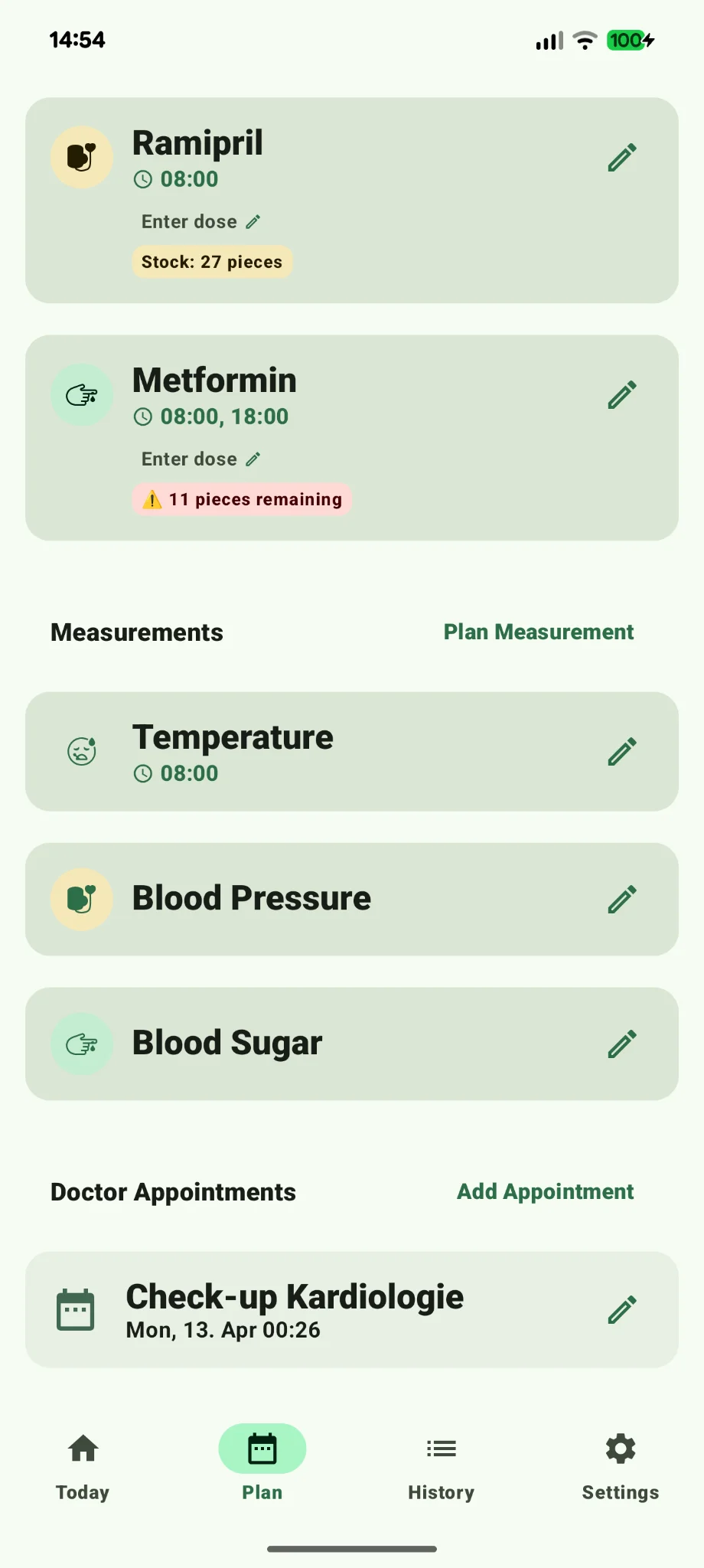
Free The Plan tab is the master list of recurring medications and measurements. Create, edit, pause, configure stock and reminders, or move entries to the trash. Anything active here shows up on the Today tab automatically.
How it works
- Start "Add Medication" or "Plan Measurement"
- Tap any row to edit dose, schedule, reminders
- Pause or trash via the row menu
Reminders & notifications
Free + Premium RemMedy schedules exact alarms for every due dose or measurement. The notification itself offers three actions right on the lock screen: Taken, Log/Postpone. Postpone presets are 15, 30, or 60 minutes, or a custom value (1–720 min). Premium unlocks persistent high-alert reminders that repeat until confirmed (configurable interval and max duration) and minute-precise postpone. Prerequisites: allow notifications, allow exact alarms, and exempt RemMedy from battery optimization.
How it works
- Grant permissions in onboarding or Settings → Notifications & Reminders
- Use "Test Reminder" in Settings – it fires in 10 seconds
- Edit medication → "Persistent reminder" for Premium alarms
Use "Plan Measurement" to create recurring measurements. Built-in kinds are blood pressure, blood sugar, pulse, temperature, and weight – you can also define custom types. The free tier allows two active measurement types. Blood pressure ships with an optional guided flow: a 5-minute rest timer, two consecutive readings, and automatic averaging. Results can be color-coded using the ACC/AHA or ESC/ESH guidelines.
How it works
- Plan → "Plan Measurement" → pick kind, frequency, times
- BP flow: start 5-min timer → reading 1 → reading 2 → save average
- Edit a measurement type in the Plan list to enable rest phase or notes
History, insights & trends
Free + Premium The History tab lists completed and skipped tasks per day plus diary entries, dose changes, and unlocked achievements. You can drill into the history of any measurement type and analyze ranges (7/14/30/90 days). "Insights & Trends" displays trend charts and statistical correlations between intakes and values, with data-quality notes (sample size, regularity) and a medical disclaimer. The free tier shows the last 30 days; Premium extends the analysis range.
How it works
- Bottom nav → History → tap a day for details
- Tap a measurement type to view its timeline
- Pick a range in Insights and read the observation text
Inventory & refill tracking
Premium You can track stock per medication: current quantity, package size, low-stock threshold. Three calculation modes are available – Simple (1 intake = 1 unit), Manual (fixed units per dose, e.g. 2 tablets), and Automatic (derived from strength, e.g. a 10 mg dose / 5 mg tablet = 2). A refill alert fires when stock falls below the threshold, showing remaining days.
How it works
- Edit medication → toggle "Track stock"
- Set package size, current stock, and threshold
- For complex doses: "Advanced calculation" → Manual or Automatic
PDF export, CSV & data transfer
Free + Premium Under "Export Data" you can create a doctor-ready PDF report (Premium), a CSV spreadsheet, or a Core JSON file for transferring between Android and iOS. Pick a date range and content sections (Measurements, Medication Intake, Therapy Timeline, Diary). All exports include a medical disclaimer and a security warning because health data is sensitive.
How it works
- Settings → Data & Export → "Export Data"
- Choose range and content
- Pick format (PDF / CSV / Core JSON) → share
Wear OS: RemMedy on your wrist
Free The Wear OS app brings RemMedy straight to your smartwatch. You get a dedicated Today screen with pending meds and measurements, a per-medication action screen (Taken / Postpone / Skip), a rotary snooze picker, a confirmation screen, and direct measurement entry (blood pressure, blood sugar, pulse, temperature, weight). There's also a Today Tile and two complications (Next Dose, Adherence) for your watch face. Even without the watch app, notifications are bridged from the phone to the watch.
How it works
- Install RemMedy on the paired watch from the Play Store
- Phone Settings → Smartwatch → "Sync now"
- Add the RemMedy tile or complication to your watch face
Diary: mood, pain, symptoms
Free Use the diary to capture how you're feeling – mood, pain level, energy, sleep quality, and free-form notes with tags (blood pressure, weight, …). The Today tab opens with "How are you feeling today?" as an entry point. Entries flow into History and help reveal patterns between medications and wellbeing.
How it works
- Tap the daily mood prompt at the top of Today
- Pick mood/tags, add a short note
- Entries appear per day in History
Trophies, streaks & Minimal Mode
Free RemMedy rewards consistency with a daily streak, achievement badges, and a Trophy Cabinet in History. Achievements cover first steps, action counts (5/25/100/1000), streaks (2/3/7/14/30/100/365 days), and monthly milestones (80%, 100%, punctuality). If you prefer calm, enable "Minimal Mode" in Settings – no confetti, no badges, just the essentials.
How it works
- History → Trophy Cabinet
- Settings → Gamification to toggle badges
- Settings → Minimal Mode for a reduced UI
Appointments, doctors & therapy history
Free RemMedy also manages doctor appointments and your care team's contacts. The therapy history chronologically logs every plan and dose change – a useful companion for doctor visits. Together with PDF export (Premium), it produces a clean timeline for the practice.
How it works
- Settings → Appointments → create appointment
- Settings → Doctors → add a contact
- Settings → Therapy History for the timeline
Injection-site rotation
Free If you inject regularly (e.g. insulin), RemMedy can rotate injection sites. It suggests a free site and remembers recent positions so no spot gets overused.
How it works
- Settings → Injection sites
- Pick body area and confirm the last site
- Accept the suggestion for the next injection
Privacy & offline use
Free RemMedy is offline-first: no account, no cloud, no ads, no advertising identifiers. All health data stays on your device. For backups and device migrations, CSV and Core JSON export/import are available (Android ↔ iOS). Imports explicitly warn that local data will be replaced.
How it works
- Onboarding explains "no account, no forced cloud"
- Settings → Data & Export for backup and import
- Settings → Privacy & Data for the full policy
Vacation periods & trash
Free For vacations or longer breaks you can define periods during which reminders stay silent automatically. Deleted medications and measurements land in the trash first – you can restore them before they're permanently removed.
How it works
- Settings → Vacation periods → add period
- Settings → Trash → restore an entry
Premium & 7-day trial
Free + Premium RemMedy is fully usable without Premium – within limits: 2 medications, 2 measurement types, 30 days of history, no snooze/follow-up, no PDF export. Premium (one-time €6.99, no subscription) unlocks unlimited entries, minute-precise reminders, persistent alarms, doctor-ready PDF exports, extended trend analysis, and smart inventory – plus every future Premium feature. New users can try Premium free for 7 days; the trial ends automatically.
How it works
- Onboarding: "Start 7-day trial" or "Continue without Premium"
- Settings → Premium & Support → "Unlock now"
- Trial banner on Today counts down the remaining days
Settings are grouped into: Display & Interaction (animations, haptics, Minimal Mode, theme), Notifications & Reminders (default times Morning/Noon/Evening/Night, snooze default, Test Reminder), Premium & Support (purchase, feedback, Help), Data & Export (export/import, trash, therapy history, vacation periods, demo data), Smartwatch (sync, refresh connection), and Legal & Feedback (privacy, disclaimer).
How it works
- Bottom nav → Settings
- Test Reminder under "Notifications & Reminders"
- Help includes FAQs, reminder tips, and support contact